Put away the stopwatch and Excel · since 2009

Work analysis, finished
from the video you record.

Upload a video and two clicks are enough. AI splits the first cycle into work elements, and standard time · VA/NVA · line balancing · MMC · PTS are all completed on one screen.

No card requiredVideos stay on my PC — never sent outCloud subscription · PC install10 languages
company.proeye-x.com · WORK ANALYSIS
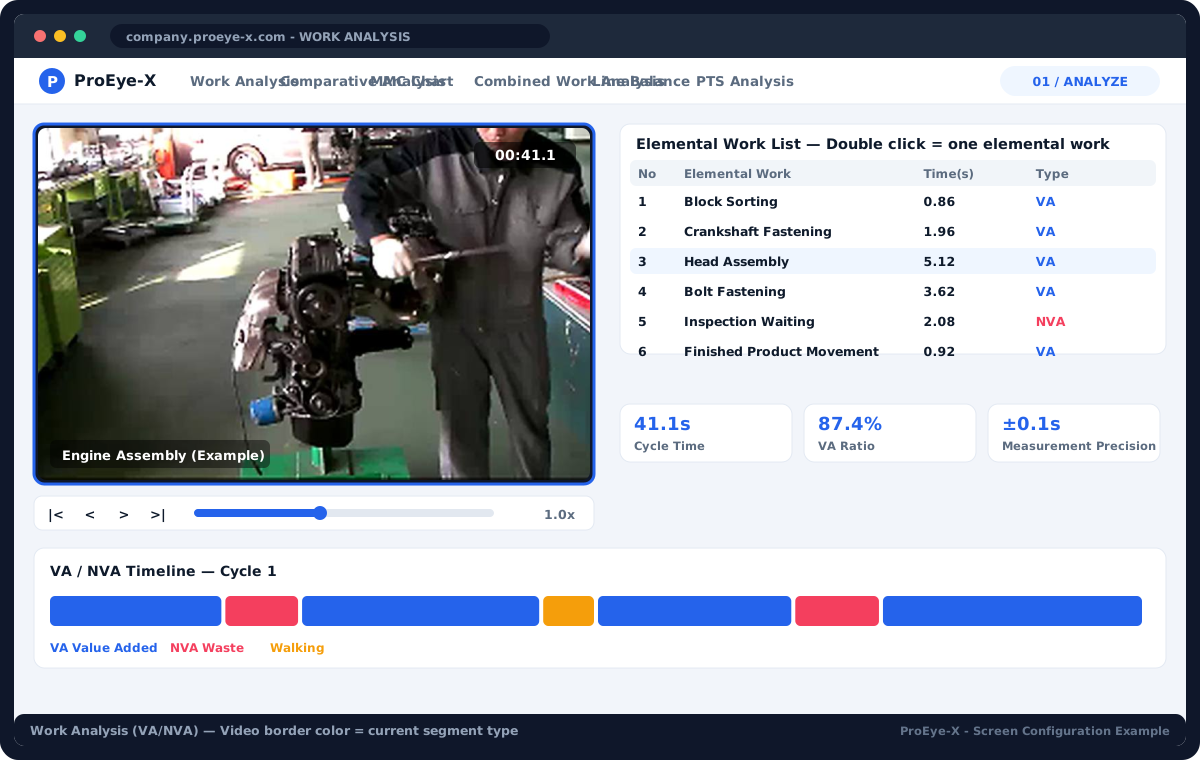
ProEye-X work analysis screen — video · work elements · VA/NVA · timeline
CT AVG 41.1s · VA 100%
AI work elements 3 · boundary error ±0.05s
Measurement precision ±0.1s
Why video

A stopwatch measures once. Video can be watched again and again.

The evidence for shop-floor improvement should be data to the second, not a feeling. One recording lets ProEye-X handle analysis · comparison · standardisation · training.

IE · production engineering

"Analysing one 53-second job means eight minutes of scrubbing a video player and typing into Excel."

Two clicks on the video make one work element. The same video is done in 86 seconds at ±0.1 s precision.

Improvement team

"We improved the line, but the report has no numbers to prove how much better it got."

Play before/after videos side by side; CT · VA rate · NVA improvement calculated automatically — a 3-page comparison PPT.

Shop-floor manager

"When a skilled operator retires, the hand skills leave with them."

Standard work sheets with a video clip per element and subtitled videos pass the skill on.

Efficiency comparison

Ordinary player + manual Excel vs ProEye-X

Actual measurements from analysing the same 53-second job video both ways.

0%
Work analysis efficiency gain (477.9 s → 230.2 s)
0×
Measurement precision (±1 s → ±0.1 s)
0h
Line analysis of 20 five-minute jobs — 18.2 h before
0%
Line analysis productivity gain
ItemPrevious method (s)ProEye-X (s)Notes
Splitting elements296.285.8Precision ±1 s → ±0.1 s
Naming elements—85.6Edited on screen instantly
Entering waste time181.768.8Mark NVA ranges → summed automatically
Total477.9230.252% faster
Reviewing an analysis102.249.4Accuracy hard to judge before
Comparing two jobsNot possiblePossibleTwo videos played side by side

※ Measured on one 53-second video. Line analysis equivalent: 20 five-minute jobs = 18.2 h before → 8.7 h with ProEye-X.

Analysis process

From recording to outputs, one flow.

Record · storeUpload phone or camera footage; stored on my PC or cloud MinIO (1GB+)
Split into elementsTwo clicks = one work element. AI splits the first cycle automatically
Six analysesVA/NVA · comparison · MMC · MAC · line balance · PTS
OutputsStandard work sheet PPT · Excel · DOC · MP4 clips · QR
Improve · trainBefore/after verification · standard work videos · skill transfer
Analysis features

Eight tools that realise the IE ideal.

Click a card to see the screen and outputs. Every feature is in both Cloud and PC Edition; AI work analysis and video editing are Cloud only.

01 / ANALYZE

Work analysis (VA/NVA)

Two clicks on the video split it into work elements and total value-added (VA) and waste (NVA) to the second. The current range shows as the colour of the video border.

  • Standard work sheet PPT (video clip per element)
  • VIEW-D work-element DOC (Excel)
  • VA/NVA · per-cycle · per-type graphs
Details →
AI

AI work analysis

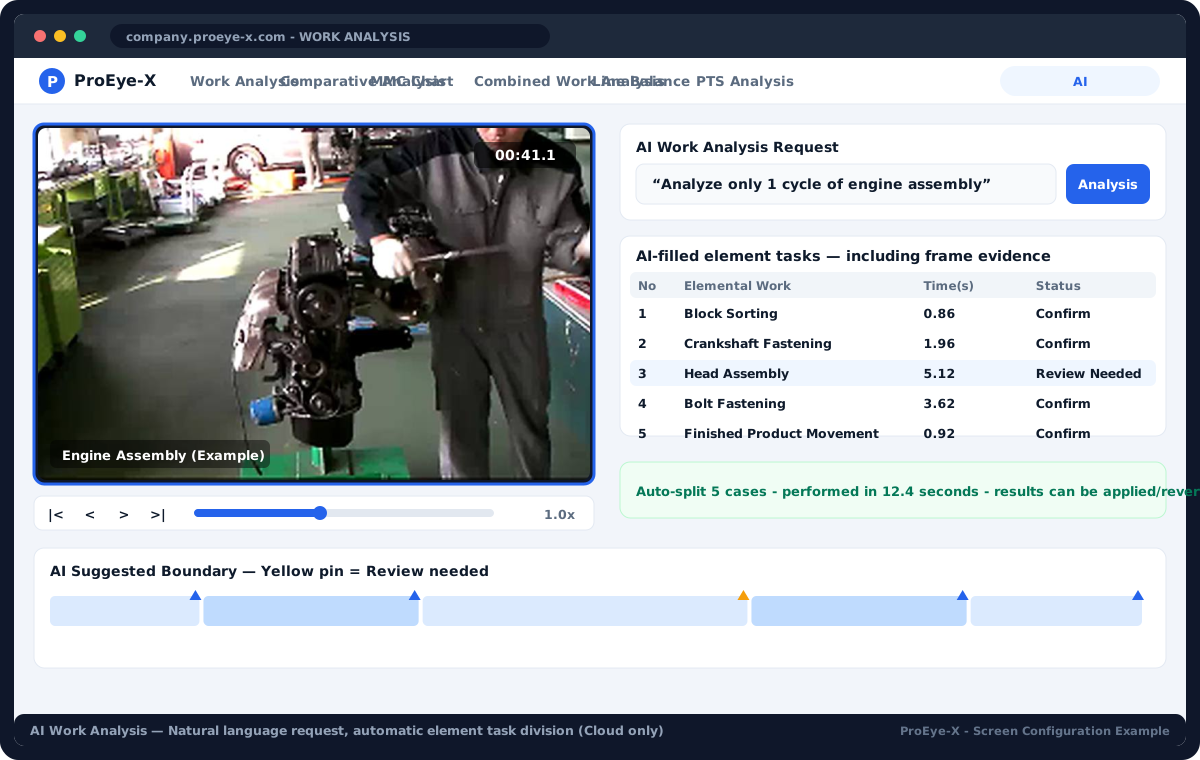
Ask in plain language — "analyse one cycle of the ballpoint-pen assembly" — and a frontier AI model finds the start and end of each work element in the first cycle from frame evidence and fills in the table. Enter your own AI API key in Settings and it works right away; apply the result to the base analysis or roll it back.

  • Automatic element split (by part change · purpose change)
  • Enter your AI API key in Settings · run time · tokens shown
  • Uncertain ranges kept as "needs review"
Details →
02 / PROVE

Comparison (Before / After)

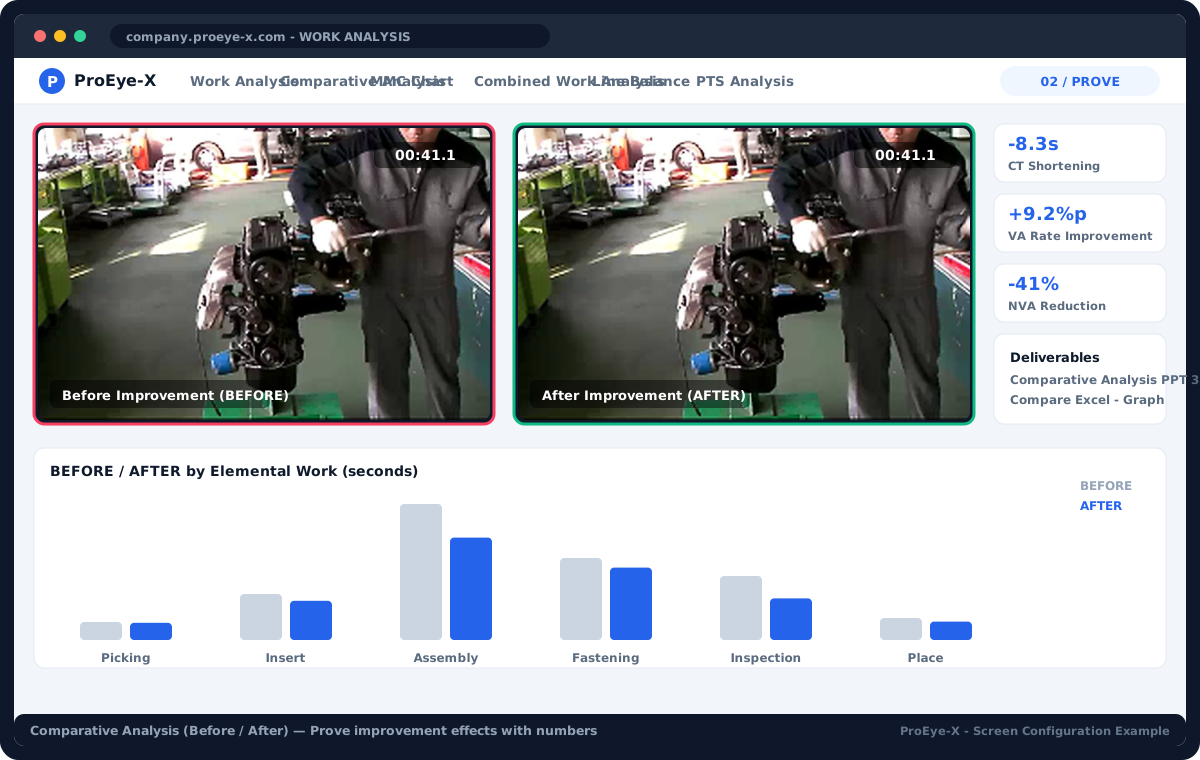
Play the before and after videos side by side and get cycle time, VA rate and NVA improvement automatically. Prove the gain in numbers.

  • 3-page comparison PPT (summary · clips · elements)
  • Comparison data Excel
  • BEFORE/AFTER graph
Details →
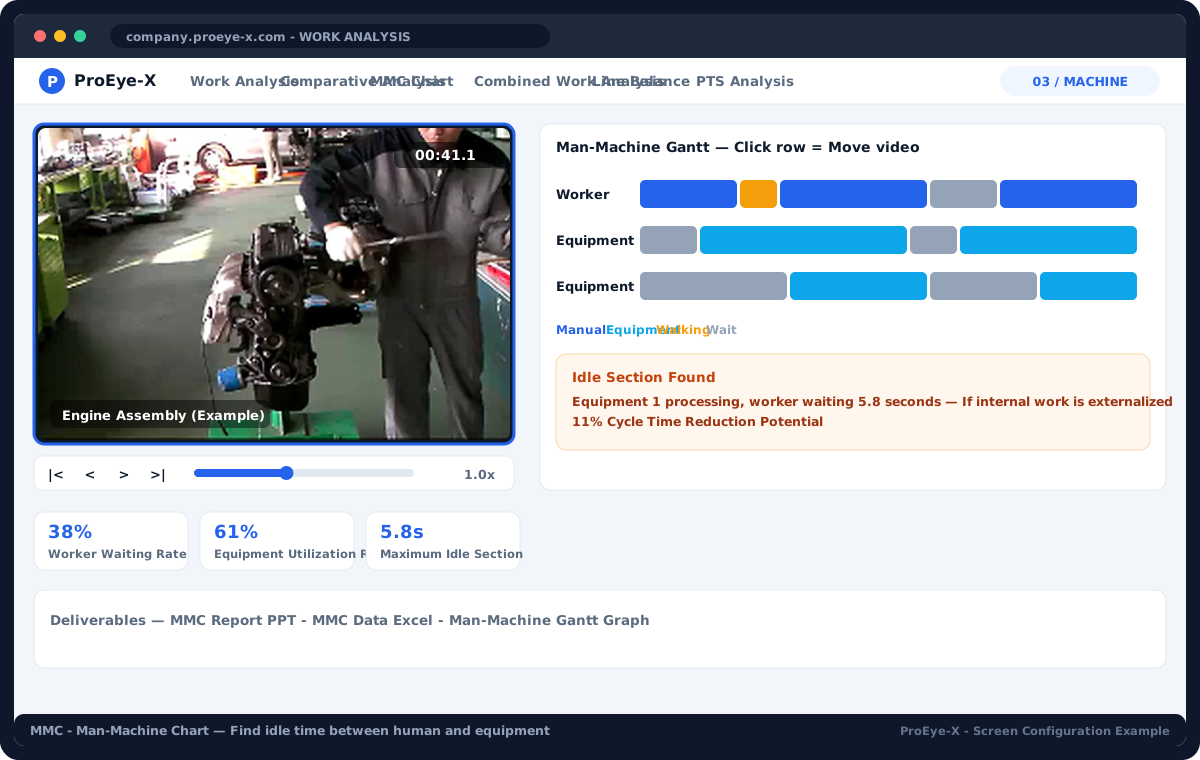
03 / MACHINE

MMC · Man-Machine Chart

Colour-codes the four types — manual · machine · walking · waiting — to find idle time between operator and machine. Click a row and the video jumps to that range.

  • MMC report PPT
  • MMC data Excel
  • Man-Machine Gantt graph
Details →
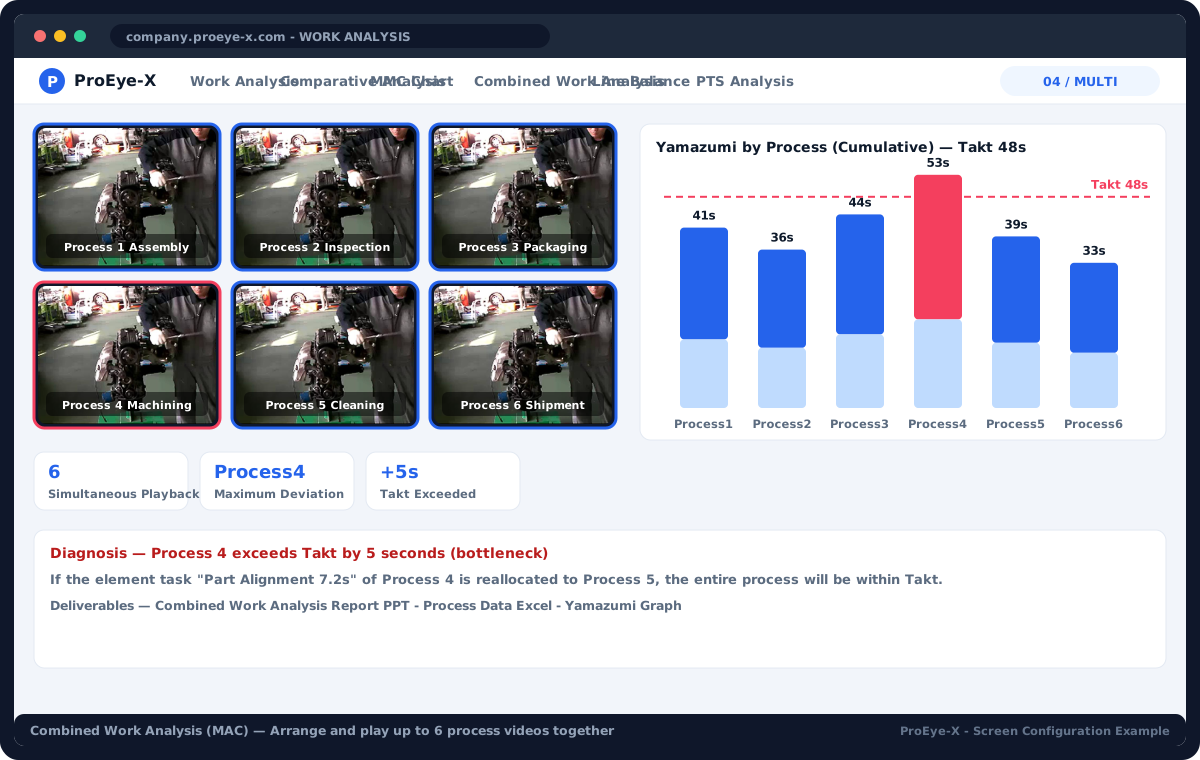
04 / MULTI

Combined work analysis (MAC)

Lay out and play up to six process videos together and diagnose workload imbalance with a per-process yamazumi (stacked) chart. Enter takt directly to compare against the baseline.

  • Combined work analysis report PPT
  • Per-process data Excel
  • Yamazumi graph
Details →
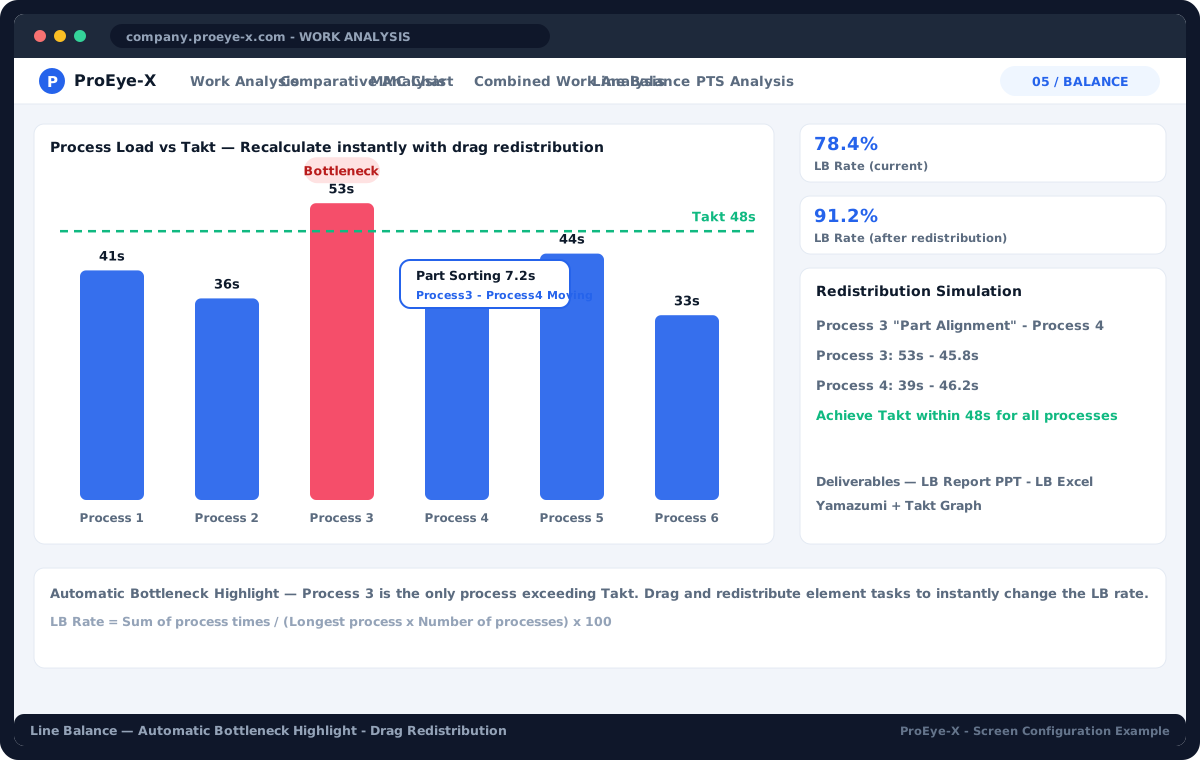
05 / BALANCE

Line balance

Compares process load with takt, highlights bottlenecks automatically and calculates the LB rate. Drag work elements to rebalance and the result updates instantly.

  • Line balance report PPT
  • LB data Excel
  • Yamazumi + takt graph
Details →
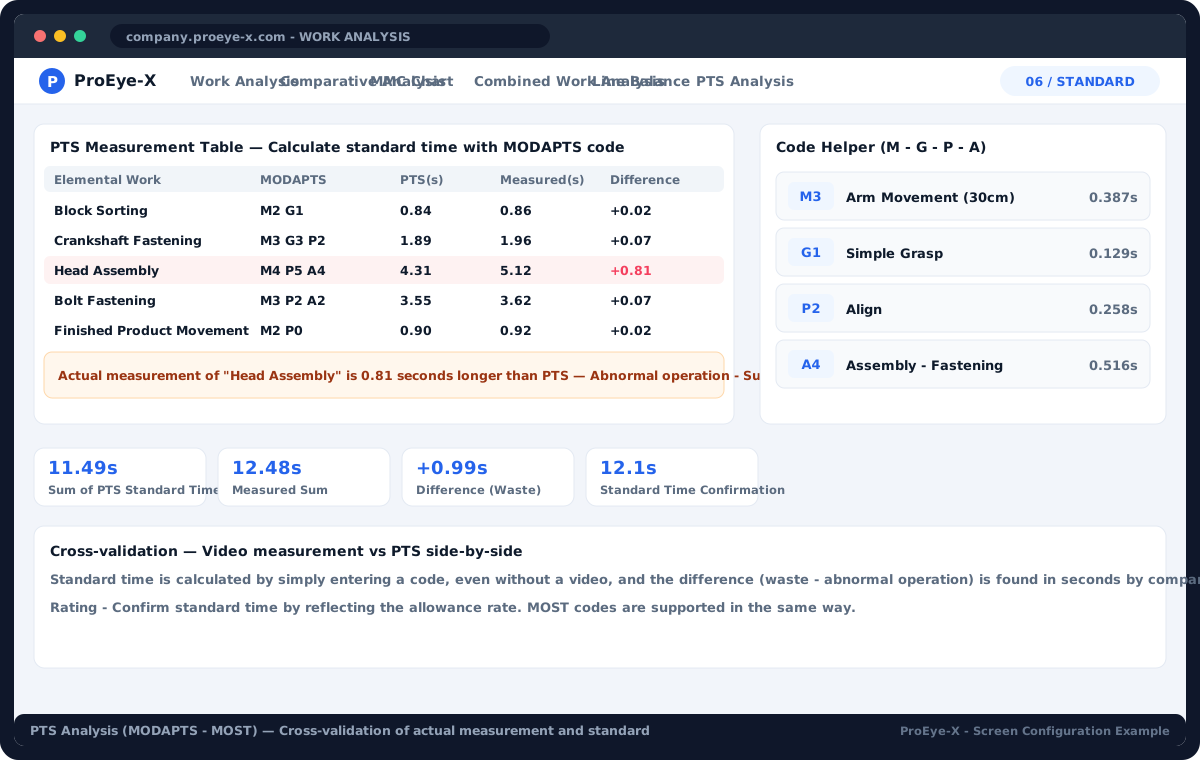
06 / STANDARD

PTS analysis (MODAPTS · MOST)

Enter MODAPTS · MOST codes per work element and the standard time is calculated without a video; cross-check it against the measured video times to find gaps (waste · abnormal motion) to the second.

  • PTS sheet · code helper (M · G · P · A)
  • Measured vs PTS comparison
  • Rating · allowance → confirmed standard time
Details →
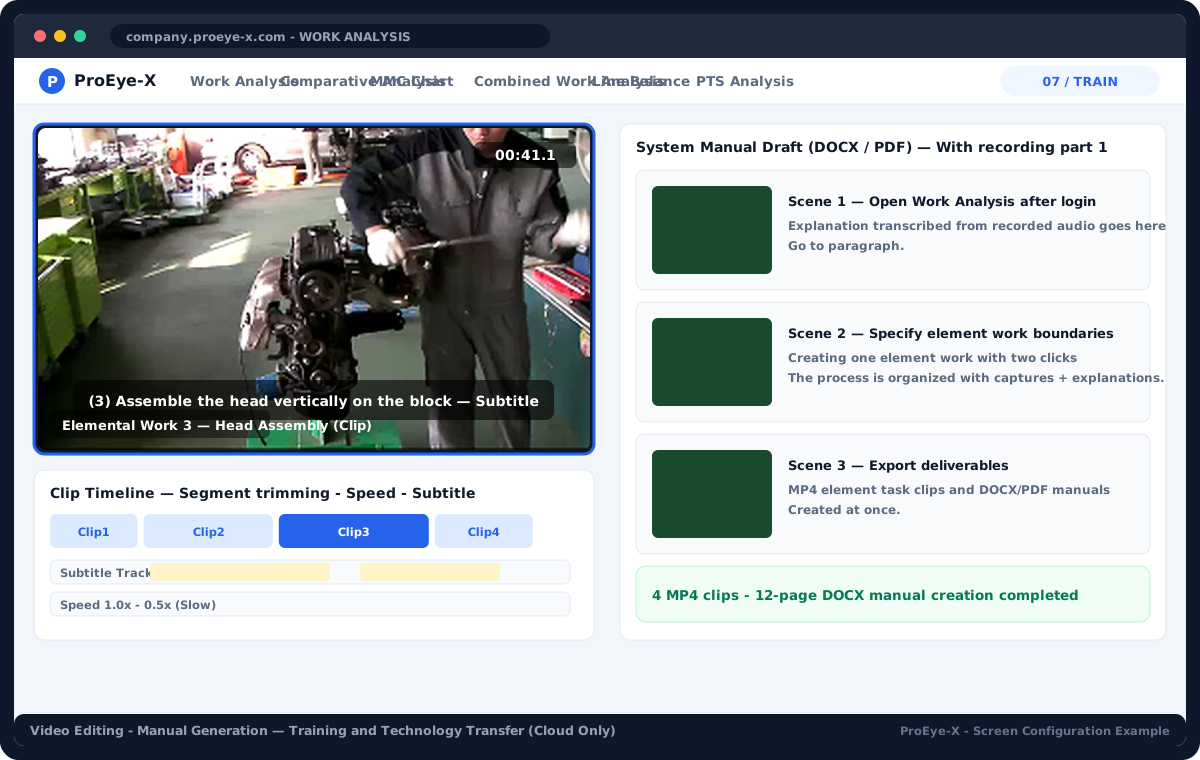
07 / TRAIN

Video editing · manual generation

Cut work-element clips and edit subtitles and speed. One narrated screen recording becomes a draft system manual (DOCX/PDF).

  • MP4 work-element clips
  • Subtitles · speed · range editing
  • Per-scene capture + explanation manual DOCX/PDF
Details →
PRODUCT WALKTHROUGH

Experience the flow of analysis on screen.

From video to elemental work, from analysis to improvement.
Explore ProEye-X's 8 tools in order.
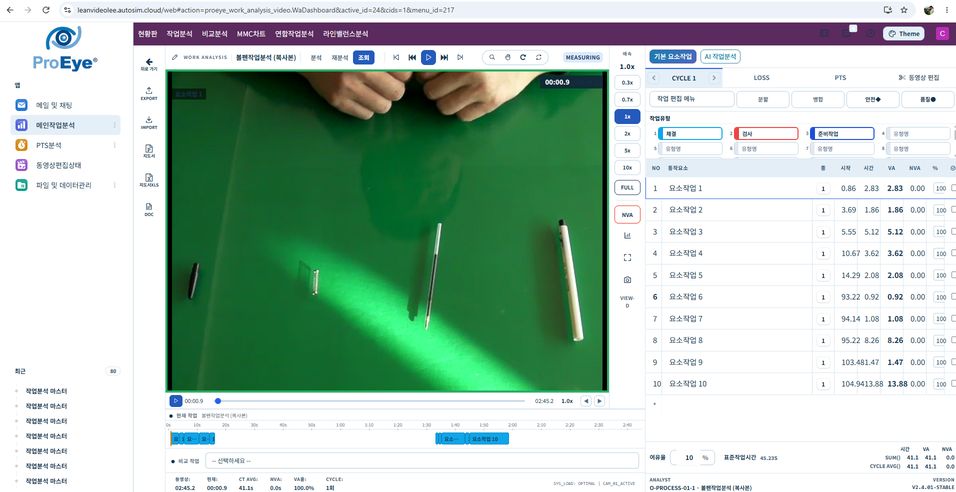
Work analysis (VA/NVA)
Outputs

When the analysis ends, the documents are ready.

Team members without ProEye-X share standard work with just PPT · Excel · MP4. The visual work instruction sheet carries a still image per element and a QR code linking to that part of the video.

PPT
Standard work sheetVideo clip per element + time · key/safety/improvement notes
PPT
Analysis reportPer-feature report with yamazumi · Gantt · comparison charts
Excel
Data sheetRaw data: work elements · times · VA/NVA · LOSS · DOC
Chart
Analysis graphsVA/NVA · per-cycle · per-type graphs (screen · PPT)
MP4
Video clipsTraining clips cut per work element
Dashboard
KPI dashboardSessions · average CT · VA rate · per-cycle trend
Security · data sovereignty

Managed centrally,
videos and data stay on my PC.

Videos are kept only on the customer's PC or on-site MinIO; the server keeps just a link. In "save on my PC" mode the analysis data (.wadata) is also stored AES-encrypted on my PC or a network drive and never lands in the server database.

Instance · accountsThe central server provides only the UI, accounts and permissions
VideoMy PC / on-site MinIO · cloud storage optional · TLS
Analysis data.wadata · AES encrypted · network folder (F:\) selectable
PC EditionComplete without internet · core logic shipped as compiled binaries (.pyd)

In "save on my PC" mode — what the server holds and what it never holds

  1. What the server holdsInstance · users · permissions · menus · AI key settings
  2. What the server never holdsOriginal videos · work-element data · output files
  3. BrowserReads and writes local folders directly via the File System Access API
  4. AI analysisTemporary upload → deleted after processing (512MB · 300 s range)
Two ways to run it

The same ProEye-X, as a Cloud subscription or a PC install.

CLOUD · SUBSCRIPTION

ProEye-X Cloud

Use it straight from the browser. Your own address https://company.proeye-x.com, 3 users included, free upgrades every year.

  • 14-day free trial · no card
  • Includes AI work analysis · video editing · video manual generation
  • 10GB cloud video storage or save on my PC
  • Monthly / annual (25% off) · card · bank transfer
USD 170/mo3 users · USD 1,540 / Annual
PC EDITION · OFFLINE

ProEye-X PC Edition

Installed on a single Windows PC with no internet, server or login — just run the icon. A perpetual licence (USB dongle) for air-gapped sites.

  • All features: work analysis · comparison · MMC · MAC · line balance · PTS
  • Videos and analysis data kept entirely on my PC (%APPDATA%\proeye-wa-video)
  • Server sharing mode — other PCs on the company LAN connect
  • Visual work instruction PPT · Excel · standard work video MP4
USD 3,430영구 라이선스
CloudPC Edition
Work analysis · comparison · MMC · MAC · line balance · PTS✓✓
AI work analysis (automatic element split)✓—
Video editing · video manual generation✓Via PowerPoint
Internet connectionRequiredNot needed
Data locationMy PC or cloud (optional)My PC only
Users3 users + extra1 PC (LAN sharing mode)
UpgradesAutomatic · freeAnnual maintenance
BillingMonthly / annual subscriptionUSD 3,430 · 영구 라이선스
Customers

The work analysis manufacturing sites have relied on since 2009.

Auto parts · electronics · heavy industry · food · chemicals · medical devices · universities — some of the sites using the ProEye series.

Samsung Electro-Mechanics
HANKUK CARBONHankuk Carbon · PC Edition
SK Innovation
Nongshim Anseong Plant
Hyundai Kefico
Samsung Medison
Tata Daewoo Commercial Vehicle
Nexen
Woongjin Coway Incheon Plant
Nautilus Hyosung
CERAGEMRepeat customer
Cresyn
Saewoo Aerospace
Daesang FNFFresh food
YongsanSeat covers · sun visors
LS Mtron
Daedong Industrial
CAMTEC
Kyungshin
Hana Micron
MEMC
Taekwang Vina
LS Cable
LS Industrial Systems
Kiturami
Kyungdong Navien
Yokogawa Korea
Dongyang Magic
Kortek
Airex
MF Tech
Heesung Metal
Zalman Tech
Prosonic
Nexolon
Jeil Wontech
Heller Korea
LS Metal
Keyang Electric
Vitzrocell
CUCKOO Electronics
LS Mtron China
LS Industrial Systems China
Amorepacific
Royal Toto
Somang Cosmetics
CJ CheilJedang
Kolen
JVM
Kwangjin
SsangYong Motor
Sangsin Brake
Daedong System
Magna Powertrain
Daewoo Bus
Packard Korea
THN
Coavis
Jinyang Oil Seal
Tenneco Korea
TCC-NB
4MI Consulting
Vianet
Korean Standards Association
Lean Logistics
Korea Industrial Education Center
Management Systems
Dreamhill
Dongseo Business Consulting
Inha University
Ajou University
Dong-A University
Digital Factory
Nexen Tech
2010 Incheon IT Technology Award — Gold, BI Company category · Incheon Regional SME Administrator's AwardSynchronised multi-video and fine-motion analysis technology — a work/motion analysis system based on video analysis (AutoSim Technology)

개발 · 제조 · 판매: 오토심테크놀로지 (AutoSim Technology)

Address: 5th Floor, 229, Seokjeong-ro, Michuhol-gu, Incheon (Dohwa-dong)

개발사 홈페이지: www.autosim-tech.com

autosim001@gmail.com

Contact: Lee Pung-jo · 010-2880-3712

Pricing

A 3-USER package per company (team). The per-user rate stays the same as you grow.

Save 25%
Cloud subscription

Free trial

Teams trying it for the first time
Free
14 days · no card · all features
3 users2GB14 days
  • All features: work analysis · comparison · MMC · MAC · line balance · PTS
  • Try AI work analysis (automatic element split)
  • 2GB video storage · save-on-my-PC mode
  • Your own address https://company.proeye-x.com
  • Data kept 30 days after the trial
Recommended Cloud subscription

Team (3 USER)

Improvement team · production engineering · IE
USD 170/mo
Per company (team) · 25% off with annual billing
3 users +10GB
  • Work analysis · comparison · MMC · MAC · line balance · PTS
  • AI work analysis · video editing · video manual generation
  • 10GB cloud video storage (unlimited in save-on-my-PC mode)
  • Standard work sheet PPT · Excel · DOC · MP4 clip outputs
  • Extra users from the 4th (same rate)
  • Free upgrades every year · e-mail support
Cloud subscription

Enterprise

Head office · multi-plant · overseas subsidiaries
Quote
Multi-plant · SSO · dedicated server · unlimited AI
500GB
  • Everything in Team + 10 or more users
  • Dedicated server or on-premise installation
  • SSO · on-site MinIO · network drive storage
  • Unlimited AI work analysis (your AI key)
  • Overseas subsidiary option · 10 languages
  • Dedicated support · training · standard work consulting
PC Edition

PC Edition

Air-gapped · offline sites
USD 3,430
One offline PC · perpetual licence
  • Windows installer (ProEye-X.exe) · no internet needed
  • USB dongle licence · perpetual use on one PC
  • Server sharing mode — several PCs on the company LAN
  • Work analysis · comparison · MMC · MAC · line balance · PTS
  • Videos and data stay on my PC only (never sent out)
  • Optional annual maintenance (upgrades)
결제

Payment is due within 30 days of the tax invoice date.

3 users · USD 170 / Monthly · USD 1,540 / Annual
4+ users · USD 60 / Monthly · USD 510 / Annual

Exchange rate: USD 1 = KRW 1,400 · USD prices rounded to the nearest USD 10

FAQ

Frequently asked questions

How do I use AI work analysis?

A frontier AI API automatically generates work elements from your video. Results are not 100% accurate: you must review the work ranges and descriptions and make corrections as needed. Enter your API key on your instance's Settings page.

How do I start the free trial?

Enter your company name and e-mail at /signup and we issue your instance at https://company.proeye-x.com within one business day. For 14 days you use every feature, including AI work analysis, with no card. Data is kept for 30 days after the trial and carries straight on when you subscribe.

Where are the videos stored?

The default is "save on my PC" mode — videos exist only on the customer's PC or on-site MinIO and the server keeps just a link. If you enable cloud storage (50GB) they are stored over TLS on the dedicated server's MinIO. Analysis data (.wadata) can also stay on my PC, AES encrypted.

What is the difference between Cloud and PC Edition?

Cloud is a browser-based subscription (your own company address, 3 users included, free upgrades every year). PC Edition is a perpetual licence (USB dongle) installed on a single Windows PC without internet, made for air-gapped sites. The analysis features are the same; AI work analysis and video editing are Cloud only.

How much does it cost to add users?

The package covers 3 users; from the 4th user it is 60,000 KRW per user per month (annual billing). The per-user rate stays the same however many you add. Check it instantly with the calculator on the pricing page.

How do I pay?

Payment is due within 30 days of the tax invoice date. Lost dongle keys for PC Edition will not be replaced.

What happens to my existing stopwatch and Excel analyses?

Work-element lists can be imported from Excel, and outputs export to PPT · Excel · DOC so they drop straight into your existing standard work documentation.

Start now

One video is all it takes for your first standard work today.

14 days free · no card · your company address within one business day. AutoSim Technology provides PC Edition quotes and demos.

Start 14 days freeCloud Edition enquiryPC Edition enquiry
REVIEWS

Customer reviews

Share your experience with ProEye-X.

JINYONG

★★★★★

It has saved me a lot of time when analyzing work. Sharing existing analysis data for presentations is very effective.

View all reviewsWrite a review
Factory Twin
From work analysis to factory operations

Explore MES, APS production planning, FMEA and PLM with Factory Twin.
Explore Factory Twin ↗factory-game.com